
How do I pause new orders when we’re busy?
On Orders, tap Pause orders and choose 10, 20 or 30 minutes, or Until I resume; customers can still see your menu but can’t place new orders.
Giving the kitchen time to catch up without switching anything off.
Steps
On Orders, tap Pause orders. On a phone it is the round button next to the title.
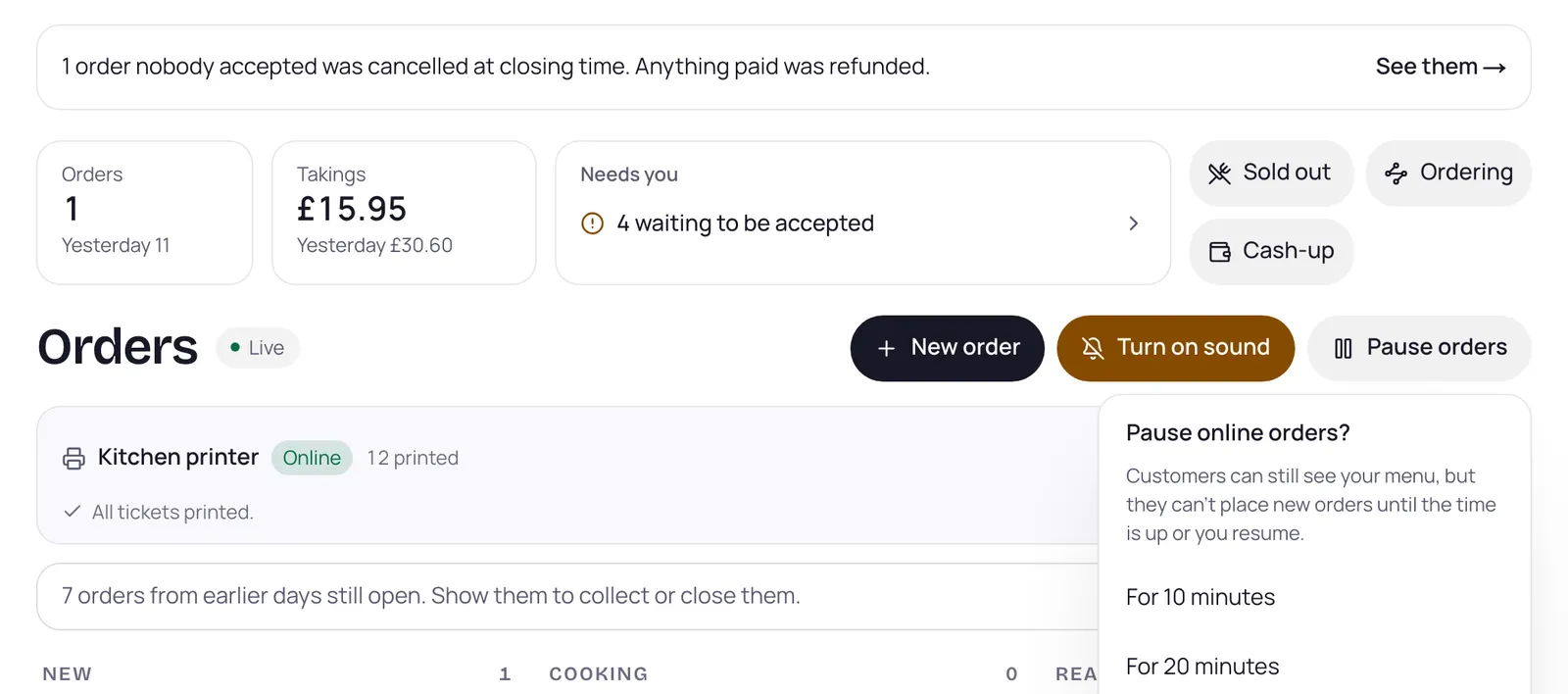
Choose 10, 20 or 30 minutes, or Until I resume.
Customers can still see your menu, but they can’t place new orders until the time is up or you resume.
To take orders again early, tap Resume.
Screens from the demo restaurant.
Related articles
- How do I accept or refuse an order?New orders appear under New on the Orders screen: tap Accept to take one, or Reject to refuse it with a reason.
- How do I mark a dish as sold out?In Menu, tap Sold out next to the dish and choose when it’s back; it greys out on the customer menu and comes back by itself.
- How do I change my opening hours?Open Settings, change the times under Opening hours and tap Save hours; ordering and your website use them straight away.
Still stuck? Contact us
Email us and say what you were trying to do, with the order number if there is one.
Platecat support: in your back office, open Help and tap Email us, or email support@platecat.com. We reply within one working day.
Email ussupport@platecat.com